


An overview of USB standards: USB 3.0 to USB4
From smartphones and cameras to mini fans: countless electronic devices feature USB ports for charging batteries and transferring data. A wide variety of USB versions are now in common use, differing in terms of their transfer speeds, performance, supported functions and technical capabilities. Our guide provides an overview of what the various USB standards are capable of.
The world’s best-known interface
USB stands for Universal Serial Bus. This serial bus system was introduced in 1996 to connect external devices to computers. While we now take this for granted, what was remarkable at the time was that devices could be connected to one another while the system was running.
Almost 30 years later, numerous developments and new standards have increased capabilities significantly in terms of speed and data volumes. The names of the USB standards have also changed over the years. This guide introduces the current standards and their various names.
USB4: speed, USB-C and key features
USB4 was introduced in 2019 with the primary aim of simplifying the confusing array of different specifications. As various USB standards use USB-C ports that look identical on the outside, the supported speed cannot be determined by the connector type alone.
USB4 is based on the Thunderbolt 3 protocol specifications, developed by Intel and now a royalty-free component of the USB specification. This enables high data transfer rates, as well as the simultaneous transmission of data, video, and power signals via a single port.
Data transfer speeds of up to 40 Gbit/s are possible with USB4. The specifications have since been further expanded with USB4 version 2.0, enabling data rates of up to 80 Gbit/s or, optionally, up to 120 Gbit/s in one direction. However, such devices are currently predominantly found in the high-end sector.
The USB-C connector is still used for USB4. It supports modern display and data protocols, as well as USB Power Delivery. This allows monitors, docking stations, and other external devices to be conveniently powered via a single port.
The specifications of the third generation of USB
It should be noted at the outset that the variety of names for the different USB standards can be confusing, as some older standards were renamed when newer ones were introduced. This has resulted in most USB standards having different names (see table).
USB 3.0 – 5 Gbit/s and new designations
The USB 3.0 standard, introduced in 2008, enabled data transfer speeds of up to 5 Gbit/s. The current capacity was also increased to 900 mA. Furthermore, it became possible to transfer multiple data streams simultaneously for the first time.
Connectors for this standard can be easily identified by the small blue plastic plate embedded in the socket. As the increased data rate of USB 3.0 places new demands on hardware and software, USB 3.0 ports are backwards compatible with USB 2.0 ports. However, the higher transfer speed can only be utilised if both the device and the cable support the relevant USB standard.
USB 3.0 was later renamed USB 3.1 (Gen 1), and then USB 3.2 Gen 1, but technically these are all the same standard with a maximum data rate of 5 Gbit/s.
USB 3.1: the leap to 10 Gbit/s
Introduced in 2013, the USB 3.1 upgrade enabled data transfer rates of up to 10 Gbit/s. When used with USB Power Delivery, compatible USB-C ports can also deliver significantly higher charging power. Following the release of USB 3.2, the USB 3.1 Gen 2 standard was renamed USB 3.2 Gen 2.
USB 3.2: variants with speeds of up to 20 Gbit/s
USB 3.2 was introduced in 2017, enabling data transfer rates of up to 20 Gbit/s. It should be noted that USB 3.2 comprises several variants. While USB 3.2 Gen 1 (5 Gbit/s) and USB 3.2 Gen 2 (10 Gbit/s) can be used with both USB-A and USB-C ports, USB 3.2 Gen 2×2 requires a USB-C port and can achieve speeds of up to 20 Gbit/s.
USB standards compared:
| Original name | Renamed to | Current name | Maximum data rate |
|---|---|---|---|
| USB 3.0 | USB 3.1 Gen 1 | USB 3.2 Gen 1 | 5 Gbit/s |
| USB 3.1 | – | USB 3.2 Gen 2 | 10 Gbit/s |
| USB 3.2 | – | USB 3.2 Gen 2×2 | 20 Gbit/s |
| USB4 | – | USB4 | up to 40 Gbit/s |
Note: USB4 version 2.0 now supports data rates of up to 80 Gbit/s, or up to 120 Gbit/s as an optional extra. However, compatible devices are still relatively rare at present.
The suffix ‘x1’ or ‘x2’ indicates how many data channels are used in parallel. While Gen 1 and Gen 2 use one data channel, Gen 2×2 uses two, thereby achieving speeds of up to 20 Gbit/s.
Comparing USB connector types
In addition to the various USB standards, there are different types of connector. The USB Type-A connector is still widely used and can be found on USB sticks, keyboards and mice, for example. The USB Type-A EASY connector can be inserted either way round, unlike other types.
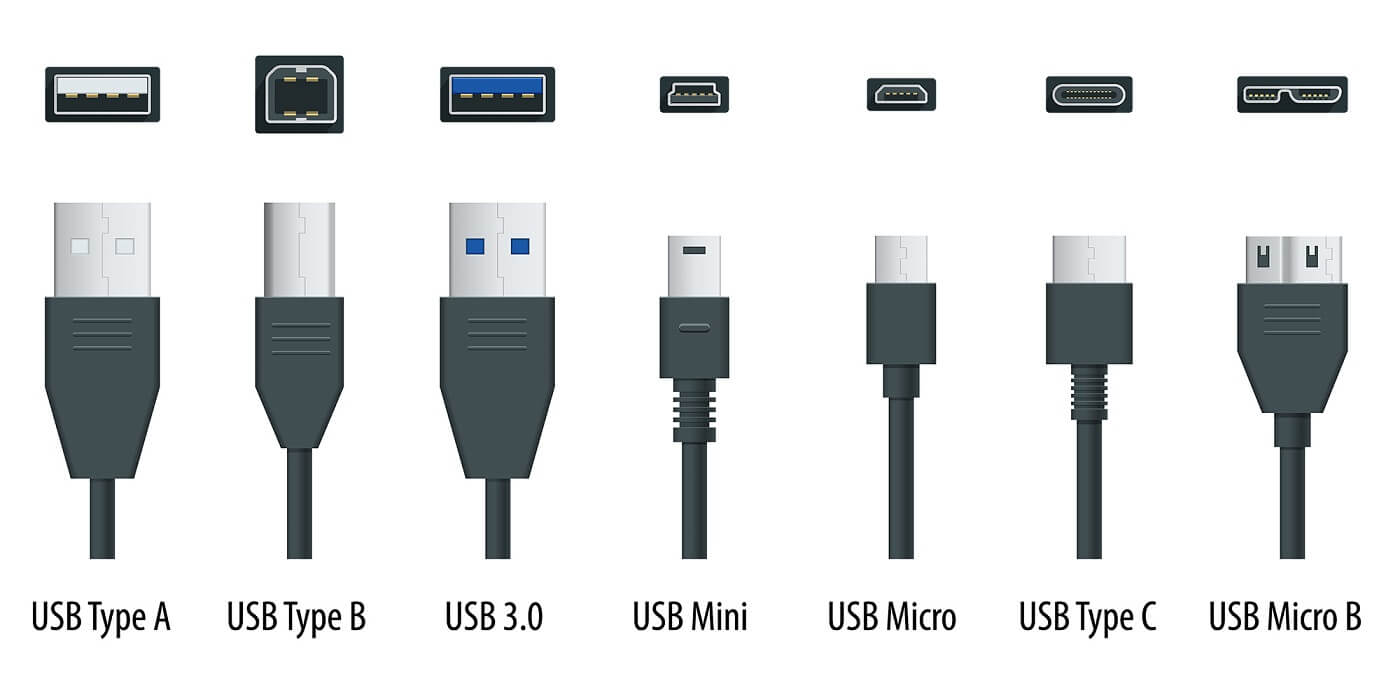
USB Type-B connectors are bulkier and have a larger recess in the centre. They support both USB 2.0 and USB 3.0.
The USB Mini-B connector marked the beginning of the compact class of USB connectors. It can still be found in older mobile phones and digital cameras. However, it has largely been replaced by the Micro-B connector, which is found in many smartphones as a port for the charging cable, for example. It supports the data transfer rate of USB 2.0.
The USB-C connector is designed to provide a uniform standard for USB connectors. Due to its flat design, it can be easily integrated into small devices. Thanks to its symmetrical shape with rounded corners, this connector is easily recognisable and can be plugged in either way.
USB standard and connector type: the difference matters
USB technology has evolved continuously since its introduction. Modern USB standards enable significantly higher data transfer rates and an efficient power supply. Depending on the equipment, they can also transmit video and audio signals.
It is important to distinguish between the USB standard and the connector type. While USB4 or USB 3.2 describe the technical specifications, USB-C simply refers to the connector’s design.
Understanding this distinction makes it easier to compare devices, cables, and accessories, and select the right solution for your needs.
FAQ: USB standards and USB-C
USB standards and USB connector types are often confused with one another. However, they describe different characteristics of a USB interface.
The USB standard specifies the supported data transfer rates and functions. The connector type, on the other hand, simply describes the physical design of the port.
For instance, a USB-C port may support USB 2.0, USB 3.2 or USB4. Conversely, depending on the variant, USB 3.2 can be used via both USB-A and USB-C ports.
No, USB-C only refers to the connector type. The data transfer rate and functions supported by a port depend on the relevant USB standard and the installed hardware.
No. Depending on the variant, USB4 supports data transfer rates of 20 Gbit/s or 40 Gbit/s. Whilst USB4 can therefore be significantly faster than USB 3.2, the maximum data rate of USB 3.2 Gen 2×2 – at 20 Gbit/s – is on a par with the slower USB4 variant. USB4 version 2.0 enables data rates of up to 80 Gbit/s.
Yes. USB4 uses the USB-C connector exclusively. However, not every USB-C port automatically supports the USB4 standard.
Yes, the USB 3.2 Gen 1 (5 Gbit/s) and Gen 2 (10 Gbit/s) variants can be used with both types of port. Only the USB 3.2 Gen 2×2 variant, which has speeds of up to 20 Gbit/s, requires a USB-C port.
This article was originally published on 2 August 2021 and updated on 11 August 2026.
Images: Adobe Stock

